තව කියවන්න
Showing posts with label android. Show all posts

Sep 14, 2018

TSR

Turn off " app running in the background " notification

One of the most frequent notification when using a phone is the notification called app running in the background.


For some people, this can be a torture at times. Let's see how to get rid of this notification.

  1. Go to settings
  2. Go to apps
  3. Next up are three dots. Touch it
  4. From that, touch show system apps
  5. From the next list, go to the android system
  6. Touch notification under app settings
  7. At the bottom, there is Apps running in background. It's on. Turn it off.
Now you don't get the notification again. Watch the video below if you don't understand how it works.


Sep 11, 2018

TSR

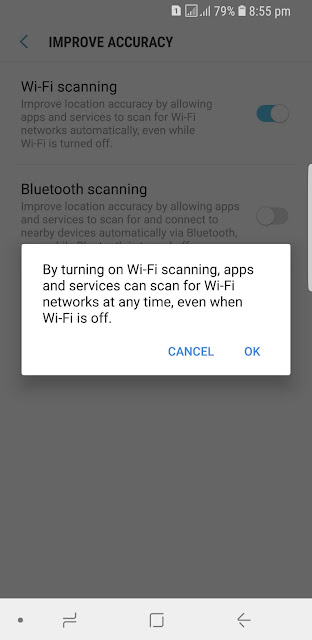
Turn off Wifi scanning pop up massage

The Wifi scanning massage is one of the massages when using our phone.


Let's see how to disable this massage.


Feb 28, 2016

TSR

Common Google Play Store errors and How to fix them


There may be problems when using the play store. For example, when you download an app, there are some error messages associated with it. Most people have. In this post we will look at the possible solutions for such errors.

              Also, if you want to know more about these issues, follow the XDA Developers forum. Well let's look at common errors and what action they can take. On the other hand, the solutions listed here are very likely to work or not.

          And that is not to say that all the errors and their solutions are not presented. Because some of the bugs are gone and the phone is getting more and more errors (for those who don't know, it's better). See if you have any errors like this.

Error DF-BPA-09 'Error Processing Purchase'

Problem

This kind of error comes when you download an app or purchase an app.

Solution
  • Go to your device's settings.
  • Go to Apps or Application Manager.
  • Go to All.
  • Now it's called Google Services Framework. Find it.
  • Select Clear Data.
  • Restart the phone.


Error 491


Problem

Downloads and Updates impossible

Solution
  • Remove Google Account.
  • Reboot the phone and add your Google Account again.
  • Go to the device settings.
  • Go to Apps or Application Manager.
  • Got to All.
  • Now it's Google services. Find it.
  • Touch Clear Data.
  • Touch Force stop.
  • Restart the phone.


Error 498

Problem

Interruption of downloads from the google play store.

Often errors like these come when the device cache is full. Unwanted applications and files should be removed at this time. Also clean the device cache. To do so, follow these steps:

Solution
  • Get the phone in recovery mode. Just turn off the phone before the new ones. For samsung devices then hold down the volume down, power button and home button for a while. Then you will see something like the one in the image above. On some samsung devices, use the volume up button instead of the volume down button.
  • Next select wipe cache partition. To do so, use the volume button.
  • Now confirm the pressing power button. Then the device cache is clean. This will not delete the phone apps.
  • Restart the phone.


Error 919

Problem

Downloading the app works but it doesn't open once downloaded.
This kind of error often comes when space is not enough.

Solution

Get rid of unnecessary music, videos, and large applications.

Error 413


Problem

Downloading applications or updates is impossible.

This kind of error usually comes if you use proxy. The use of proxy directly affects the play store.


Solution
  • Go to your device's settings.
  • Go to Apps or Application Manager.
  • Go to All.
  • Now it's Google services. Find it.
  • Select Clear Data and click OK.
  • Click Force and click OK.
  • Similarly find the play store and internet browser and clear the cache. No need to force stop.
  • Restart the phone.


Error 923

Problem

The download is impossible: error while syncing your google account or insufficient cache memory.

Solution
  • Remove google account. Remove any apps that are not useful.
  • Get the phone in recovery mode. How to get into recovery mode. To go to  recovery mode refer Error 498.
  • Next select wipe cache partition. To do so, use the volume button.
  • Now confirm the power button. Then the device cache is clean. This will not delete the phone apps.
  • Turn on the phone and set up google account.

Error 921

Problem

You can't download an app.

Solution
  • Clear the cache in the play store. If that doesn't work, clear the data in the play store apps.
  • If that doesn't work, the final solution is to remove the Google Account, restart the phone and reset your Google Account..

Error 403

Problem

The download is impossible and the request is forbidden.

An error like this usually comes from using two Google accounts on one and the same device, if you buy apps and use a proxy.

Solution 1

  • Go to the play store using the right google account. Uninstall the app that causes the problem.
  • Buy the app again using the play store.

Feb 23, 2016

TSR

Stock Rom and Custom Rom


The stock rom and custom rom are often asked by those who use Android smartphone. For those who have been using Android for a long time, you have heard a lot about it. Okay let's see what this stock rom and custom rom are.

stock Rom

When you buy a smartphone, stock rom is the official Android version of the smartphone.

The administrative privileges of a phone with a stock rom are not given to the person using it. That means we can do everything we want, like uninstall the system application, change the boot animation, and the boot sound. But if you have a stock rom you can root the phone and make those changes. Remember that rooting and installing a custom rom are two. Let me explain how to root. 


custom Rom

In some cases, it means that a custom rom is for an unofficial android version that someone develops and customizes.


Advantages of using a custom rom


  • ability to update always such as system updates, software updates
  • faster and use less memory capacity
  • you can use any android version. that means those who are using android version such as gingerbread, they can install android versions jellybean, kitkat or lollipop.

There are good and bad sides to everything.


Disadvantages


If installing a custom rom is a must. That is because the phone can brick while installing the custom rom. So, again, the phone doesn't matter. Nothing could be done. But some Eve can be rebuilt (unbrick). The extent of the damage is. And that's what warrenty canceled. Some problems may arise. But just do it right. So let's meet up with another post.

Feb 20, 2016

TSR

Play Clash of Clans on your computer


I'm going to tell you how to play most popular clash of clans game on your computer.

This is a common problem that those who can not play clash of clans on smartphones. But you can play this game using bluestack or Andy android emulator. I recommend you to use Andy android emulator. Because when you use bluestack it takes higher processor and ram capacity. So that search in google that Andy android emulator and download the software from the official website.


Feb 19, 2016

TSR

Install android apps on computer

~BlueStack~


You can install any android app on your computer using this software. It works as a smartphone.


Many people have trouble figuring out how to install Android apps on their PCs. This is a problem for many people who don't have a smartphone. However, this software can install any app on your computer.


You can play any android app such as clash of clans, candy crush and more on your computer.